
Tuesday, May 29, 2012

Exceptions in Java: throws and throwing
"Throwing an exception in Java" ( http://bit.ly/16NNr1s )
"Exceptions in Java: the throws declaration" ( http://bit.ly/KMd0SG )
How to Make Dialogs (JOptionPane)
"How to Make Dialogs (The Java™ Tutorials > Creating a GUI With JFC/Swing > Using Swing Components)" ( http://bit.ly/KLuBtY )
Monday, May 28, 2012
PrintWriter
DOWNLOAD THE CODE: PrintToFile.java
The PrintWriter class contains 2 very useful methods:
- print(String)
- println(String)
The println method adds the end-of-line character after the string.
The constructor of the PrintWriter class accepts a file to write to. As such, a File object has been declared. The constructor of the File object accepts a String file path of the file's location. It is interesting to note that if the file has not already been created, the PrintWriter will create it automatically.
The example below contains 2 loops. The first loop writes the numbers 1-10 (using the loop counter) to data.txt using the print() method. As such, each number is written immediately after the last. The second loop also writes the numbers 1-10 to data.txt but uses the println() method so that each number is written on a new line.

Here is the output:

Throws FileNotFoundException. If you do not implement exception handling for this exception, the compiler will force you to rethrow it.
And if you want to read text file from a file, here's a post about the Scanner class.
"PrintWriter (Java Platform SE 7 )" ( http://bit.ly/LsOVki )
Here's a cat:

Sunday, May 27, 2012
While loop
DOWNLOAD THE CODE: usingWhileLoops.java.zip
While is a type of loop. Statements inside of the loop will continue to repeat while the loop condition is true.
The while loop is primed with a boolean expression/condition. When the condition becomes false, the loop will stop.
while (condition) {
// statements to loop.
}
The example below uses a while loop to increment the value of the int variable num. On each pass of the loop, num has 100 added to it. The loop will continue to execute while the value of num is less than or equal to the value of the int variable maxnum.


"Java For Complete Beginners - while loops" ( http://bit.ly/JGnAII )
While is a type of loop. Statements inside of the loop will continue to repeat while the loop condition is true.
The while loop is primed with a boolean expression/condition. When the condition becomes false, the loop will stop.
while (condition) {
// statements to loop.
}
The example below uses a while loop to increment the value of the int variable num. On each pass of the loop, num has 100 added to it. The loop will continue to execute while the value of num is less than or equal to the value of the int variable maxnum.
The output:
The loop condition can be any expression that return a boolean value.
"Java For Complete Beginners - while loops" ( http://bit.ly/JGnAII )
What is a Sequence Diagram?
A sequence diagram is a UML (Unified Modelling Language) diagram. It is used to show the interactions between objects in the sequence they occur.
Here is a class diagram of the objects in the system...


Where a class diagram shows the details of each class & the relationships between them; a sequence diagram shows the sequential interactions between these objects.
Lifelines
Each object has a lifeline. This is a dashed line. The solid areas denote when an object is active in a process.


"UML basics: The sequence diagram" ( http://ibm.co/Lk8yqN )
err....here's a cat:

Here is a class diagram of the objects in the system...

The sequence diagram below, models the interactions required to get the 'Message' from the SpecialPower object.

Where a class diagram shows the details of each class & the relationships between them; a sequence diagram shows the sequential interactions between these objects.
Lifelines
Each object has a lifeline. This is a dashed line. The solid areas denote when an object is active in a process.
Numbering
Notice that each interaction in the sequence diagram is numbered according to the sequential flow of execution.
Void
In design documentation, where no value is returned from an interaction, the word 'void' is often used. A 'void' return is often seen as the result of instantiating an object. This is because a constructor cannot return a value. As well as that, you could expect to see 'void' as the return from a sub procedure.
"UML basics: The sequence diagram" ( http://ibm.co/Lk8yqN )
err....here's a cat:

Visibility
"Controlling Access to Members of a Class (The Java™ Tutorials > Learning the Java Language > Classes and Objects)" ( http://bit.ly/JgfUgH )
What is a Constant? Final keyword
DOWNLOAD THE CODE: FinalValuePkg
We can store a value in a constant. Very similar to a variable except that a constant has a constant value. That is, the stored value is never changed as a result of processing.
Constants are used where a value should never be changed such as a maximum, minimum, number of hours in a day, days in a week, etc.
A constant begins with the keyword final. Just as with a variable, a type & identifier must be given.


CIRCLE_WIDTH and CIRCLE_HEIGHT are defined using uppercase and have each been assigned a value.
"Java Syntax: Declaring and Using Constants in Java" ( http://bit.ly/JmgF5S )
Here's a cat:

We can store a value in a constant. Very similar to a variable except that a constant has a constant value. That is, the stored value is never changed as a result of processing.
Constants are used where a value should never be changed such as a maximum, minimum, number of hours in a day, days in a week, etc.
A constant begins with the keyword final. Just as with a variable, a type & identifier must be given.
The compiler will not allow any processing statements to change the values of these constants.
UML Class Diagram Notation
The UML Class Diagram notation for a constant (final) is as below:
CIRCLE_WIDTH and CIRCLE_HEIGHT are defined using uppercase and have each been assigned a value.
"Java Syntax: Declaring and Using Constants in Java" ( http://bit.ly/JmgF5S )
Here's a cat:

Wednesday, May 23, 2012
The split function
DOWNLOAD THE CODE: usingSplit.java.zip
Example 1: split a string using a space as the delimiter:

Output:

Example 2: split a string using a comma (,) as the delimiter:

Output:

Boolean
The boolean datatype can store the value True or False.

Where a boolean has not been assigned a value, by default it's value is false.
The format for declaring a boolean variable is:
Type identifier;
Where the Type is boolean and the identifier is exists:
boolean exists;
...and where a value of true has been assigned:
boolean exists = true;
Where a boolean has not been assigned a value, by default it's value is false.
The format for declaring a boolean variable is:
Type identifier;
Where the Type is boolean and the identifier is exists:
boolean exists;
...and where a value of true has been assigned:
boolean exists = true;
You can declare a boolean in one statement and assign it a value in another statement:
boolean exists;
// other statements...
exists = true;
Monday, May 21, 2012
Scanner class - Part 2.
DOWNLOAD THE CODE: Scanner.zip
<< Continued from part 1
In the next example, we will nominate a character to use as a delineation token - the semi-colon (;).
Below is the text file shoppinglist2.txt. Note that each line contains a semi-colon. Now, rather than defaulting to whitespace as the delineation token, the Scanner will look for the semi-colon character.


<< Continued from part 1
In the next example, we will nominate a character to use as a delineation token - the semi-colon (;).
Below is the text file shoppinglist2.txt. Note that each line contains a semi-colon. Now, rather than defaulting to whitespace as the delineation token, the Scanner will look for the semi-colon character.
Here's the code:
Note that the Scanner's property useDelimiter has been set to use the semi-colon (;). Each token is now measured by the presence of a semi-colon.
Here's the result:
Related: Using the split() function >>>
Unified Modelling Language - UML
"Unified Modeling Language - Wikipedia, the free encyclopedia" ( http://bit.ly/Lk7zXy )
"UML basics: The class diagram" ( http://ibm.co/Jwpxv3 )
"UML basics: The sequence diagram" ( http://ibm.co/Lk8yqN )
"Activity diagram - Wikipedia, the free encyclopedia" ( http://bit.ly/Jwq4Nu )
Eclipse Tip: Correct indentation
Code indentation can become messy and as a result, the code can be difficult to read.
Eclipse has an option to 'Correct Indentation'.

Eclipse has an option to 'Correct Indentation'.
- Right click the code you wish to clean up
- Select Source
- Select Correct Indentation
Friday, May 18, 2012
The 'static' keyword
Download the code
Static variables & methods are associated with the class rather than an instance of an object of that class.
Usually, the data contained within an object, belongs only to that instance.
If you want all instances of a class to share some data, use a static variable. A static variable belongs to the class, rather than an instance the class (object).
The example below uses a static variable to keep count of the number of Widget objects that have been created.
The Widget class contains a single static variable called _numberOfWidgets. No matter how many instances of Widget are created, there will be a single value associated with the _numberOfWidgets variable.
A static method is provided to set the value of _numberOfWidgets and a static method is provided to get the value of _numberOfWidgets. In this example, the constructor calls the set method and in turn, the set method increments the value.

In the TestWidgetClass below, a number of Widget instances are created. Note that the call to the get_numberOfWidgets method is made by referencing the class directly, rather than by instance of the class.

And the output is:

"Understanding Instance and Class Members (The Java™ Tutorials > Learning the Java Language > Classes and Objects)" ( http://bit.ly/KmbYd7 )
In a UML class diagram, Static variables & methods are represented with an underline.

Here's a cat to keep you calm:

Parameters / Arguments
See also:
"Passing Information to a Method or a Constructor (The Java™ Tutorials > Learning the Java Language > Classes and Objects)" ( http://bit.ly/XxwPUf )

Thursday, May 10, 2012
Multiplicity
Multiplicity refers to the number of relationships that exists between 2 classes in a composite relationship.
In the diagram below, Player has a 1 to 1 relationship with the Sword class and the Flight class.

In the diagram below, Player has a 1 to 1 relationship with the Sword class and the Flight class.
Composition: Has-a
"Object composition - Wikipedia, the free encyclopedia" ( http://bit.ly/K0qMRm )
"Has-a - Wikipedia, the free encyclopedia" ( http://bit.ly/JWe9mb )
Composition is a relationship between objects. When one object is composed of others, this is said to be a composite relationship.
In the class diagram below, the Player class has-a relationship with the InventoryItem class. Another was to say this is that the Player class is composed of multiple classes.

Object-oriented design & programming
"Object-oriented programming - Wikipedia, the free encyclopedia" ( http://bit.ly/cLXHSq )
"Object-oriented design - Wikipedia, the free encyclopedia" ( http://bit.ly/cbnJAY )
"Object-oriented design - Wikipedia, the free encyclopedia" ( http://bit.ly/cbnJAY )
Are you reading the javapants blog?
Hi. This blog is not meant to be read in a linear fashion. Refer to it by using the tag list down the right hand side. Get what you need. Clear as mud?
Encapsulation: Public & Private
"Controlling Access to Members of a Class (The Java™ Tutorials > Learning the Java Language > Classes and Objects)" ( http://bit.ly/JgfUgH )
Another way to refer to encapsulation is 'information hiding'.
Private
A variable/state, method that is declared as private is only visible to the class that contains the variable or method. For instance:

The above class (Player) contains 5 private states (implemented as variables). As these states are private, they can only be modified directly from within the Player class.
Public
Variables/states, methods & classes that are declared as public are visible to all other classes. For instance:

The above method is the constructor of the Player class. As a constructor is the first method called in the instantiation (object creation) process, it is vital that this constructor has a visibility of public.
Also:

The above getter & setter behaviors also belong to the Player class. These behaviors allow access to the internal state called _name. As such, they both have a visibility of public.
What is Encapsulation?
Encapsulation is the process of packaging the base functionality of a class and providing access to the features of the class through a collection of behaviors. This means that the inner workings of the class are hidden from other classes and cannot be directly accessed.
Encapsulation is the process of packaging the base functionality of a class and providing access to the features of the class through a collection of behaviors. This means that the inner workings of the class are hidden from other classes and cannot be directly accessed.
Objects are responsible for maintaining their own state & behavior.
Another way to refer to encapsulation is 'information hiding'.
Following the laws of encapsulation, when designing a class, it is important to define the visibility of the states and behaviors contained within the class. This is known as visibility.
Private
A variable/state, method that is declared as private is only visible to the class that contains the variable or method. For instance:
The above class (Player) contains 5 private states (implemented as variables). As these states are private, they can only be modified directly from within the Player class.
When a state is private, no other object can read or change the value, directly. Getter & setter behaviors must be provided to allow access to these states, where access is required.
Public
Variables/states, methods & classes that are declared as public are visible to all other classes. For instance:

The above method is the constructor of the Player class. As a constructor is the first method called in the instantiation (object creation) process, it is vital that this constructor has a visibility of public.
Also:
The above getter & setter behaviors also belong to the Player class. These behaviors allow access to the internal state called _name. As such, they both have a visibility of public.
Tuesday, May 8, 2012
ArrayList
An ArrayList is a resizable array. There is no need to tell the ArrayList how many items it can store.
Similar to an array, in that all objects in the ArrayList occupy an index (and remember, indexes begin at 0).
Additionally, items may be added and removed without providing an index.
Instantiating ArrayList
Syntax:
ArrayList<Type> identifier = new ArrayList<Type>();
example:
ArrayList<String> customerNames = new ArrayList<String>();
In the example above, the ArrayList can store a collection of Strings.
We can also add user defined types (Types/classes we have created) to ArrayList.
Let's say for instance we have a class type called Player. We can create an ArrayList to store a collection of Player objects:
example:
ArrayList<Player> playerList = new ArrayList<Player>();
Adding to ArrayList
Syntax:
identifier.add(object);
example:
playerList.add(new Player("baz",100));
In the example above, a Player is added to the ArrayList. The new object is added to the end of the list.
Notice that we can instantiate the Player object directly into the add method.
Alternatively, we could add an existing Player object to the ArrayList:
Player p = new Player("maz",200);
playerList.add(p);
Replacing an element in ArrayList
Syntax:
identifier.set(index,object);
example:
playerList.set(10, new Player("baz",100));
In the example above, a Player object at index 10 is replaced in the ArrayList.
Removing from ArrayList
Syntax:
identifier.remove(index);
example:
playerList.remove(3);
Check ArrayList for element
Syntax:
identifier.contains(object);
example:
playerList.contains(myObj);
In the example above, the list will return true or false depending on whether the object called obj is found in the list - note: you must override the equals method to use this effectively!.
Getting the number of items in ArrayList
Syntax:
identifier.size();
example:
playerList.size();
In the example below, the size function is used to set the continuation condition in a for loop:
for (int x = 0; x < playerList.size(); x ++) { }
Looping through ArrayList
ArrayList contains a method called get which enables you to return the object in the list at a specific index.
Syntax:
identifier.get(index);
example:
playerList.get(1);
In the above example, we get the Player object at index 1 (the second object in the list).
In the example below, we loop through an ArrayList, using the loop counter to get each object in turn:
for (int x = 0; x < playerList.size(); x ++) {
Player currentPlayer = playerList.get(x);
}
If there are 20 Player objects in the list, the loop will iterate 20 times. On each pass of the loop, the get method returns the Player object at the specified index. As we are using the loop counter to provide this value, we are able to get each object in the list, in turn.
Searching ArrayList for a particular object
In the following example, we search ArrayList for a Player object, by playerID (the particular playerID is passed to the function as a parameter). An equality comparison is performed within the loop using the equality operator ( = = ):
public Player searchForPlayer(int playerID) {
Player p = null;
for (int x = 0; x < playerList.size(); x ++) {
Player currentPlayer = playerList.get(x);
if (currentPlayer.getID == playerID) {
p = currentPlayer;
}
}
return p;
}
In the following example, we search ArrayList for a Player object, by playerName (the particular playerName is passed to the function as a parameter). An equality comparison is performed within the loops using the equals function:
public Player searchForPlayer(String playerName) {
Player p = null;
for (int x = 0; x < playerList.size(); x ++) {
Player currentPlayer = playerList.get(x);
if (currentPlayer.getName.equals(playerName) {
p = currentPlayer;
}
}
return p;
}
"ArrayList (Java 2 Platform SE v1.4.2)" ( http://bit.ly/Ja6HGS )
Similar to an array, in that all objects in the ArrayList occupy an index (and remember, indexes begin at 0).
Additionally, items may be added and removed without providing an index.
Instantiating ArrayList
Syntax:
ArrayList<Type> identifier = new ArrayList<Type>();
example:
ArrayList<String> customerNames = new ArrayList<String>();
In the example above, the ArrayList can store a collection of Strings.
We can also add user defined types (Types/classes we have created) to ArrayList.
Let's say for instance we have a class type called Player. We can create an ArrayList to store a collection of Player objects:
example:
ArrayList<Player> playerList = new ArrayList<Player>();
Adding to ArrayList
Syntax:
identifier.add(object);
example:
playerList.add(new Player("baz",100));
In the example above, a Player is added to the ArrayList. The new object is added to the end of the list.
Notice that we can instantiate the Player object directly into the add method.
Alternatively, we could add an existing Player object to the ArrayList:
Player p = new Player("maz",200);
playerList.add(p);
Replacing an element in ArrayList
Syntax:
identifier.set(index,object);
example:
playerList.set(10, new Player("baz",100));
In the example above, a Player object at index 10 is replaced in the ArrayList.
Removing from ArrayList
Syntax:
identifier.remove(index);
example:
playerList.remove(3);
Check ArrayList for element
Syntax:
identifier.contains(object);
example:
playerList.contains(myObj);
In the example above, the list will return true or false depending on whether the object called obj is found in the list - note: you must override the equals method to use this effectively!.
Getting the number of items in ArrayList
Syntax:
identifier.size();
example:
playerList.size();
In the example below, the size function is used to set the continuation condition in a for loop:
for (int x = 0; x < playerList.size(); x ++) { }
Looping through ArrayList
ArrayList contains a method called get which enables you to return the object in the list at a specific index.
Syntax:
identifier.get(index);
example:
playerList.get(1);
In the above example, we get the Player object at index 1 (the second object in the list).
In the example below, we loop through an ArrayList, using the loop counter to get each object in turn:
for (int x = 0; x < playerList.size(); x ++) {
Player currentPlayer = playerList.get(x);
}
If there are 20 Player objects in the list, the loop will iterate 20 times. On each pass of the loop, the get method returns the Player object at the specified index. As we are using the loop counter to provide this value, we are able to get each object in the list, in turn.
Searching ArrayList for a particular object
In the following example, we search ArrayList for a Player object, by playerID (the particular playerID is passed to the function as a parameter). An equality comparison is performed within the loop using the equality operator ( = = ):
public Player searchForPlayer(int playerID) {
Player p = null;
for (int x = 0; x < playerList.size(); x ++) {
Player currentPlayer = playerList.get(x);
if (currentPlayer.getID == playerID) {
p = currentPlayer;
}
}
return p;
}
In the following example, we search ArrayList for a Player object, by playerName (the particular playerName is passed to the function as a parameter). An equality comparison is performed within the loops using the equals function:
public Player searchForPlayer(String playerName) {
Player p = null;
for (int x = 0; x < playerList.size(); x ++) {
Player currentPlayer = playerList.get(x);
if (currentPlayer.getName.equals(playerName) {
p = currentPlayer;
}
}
return p;
}
"ArrayList (Java 2 Platform SE v1.4.2)" ( http://bit.ly/Ja6HGS )
Monday, May 7, 2012
Layout Managers
"A Visual Guide to Layout Managers (The Java™ Tutorials > Creating a GUI With JFC/Swing > Laying Out Components Within a Container)" ( http://bit.ly/LpAHle )
Java Arrays
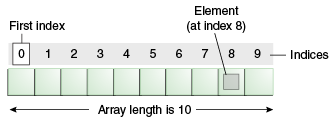
Whilst a variable can hold a single data item of a specified type, an array can hold a number of data items of a specified type.
The following example shows an array of 7 strings. The array stores the names of the days of the week. Once this collection is stored, we can access each string in the array by it's index.

Syntax:
Type[] identifier = new Type[length];
Example:
String[] names = new String[10];
Arrays need to be declared as a certain length - for instance, the example above will hold 10 Strings.
Each item in the array occupies an index. Indexes begin at 0 (zero) in an array.
Example: Manually populate an array:
int[] numberList = new int[3]
numberList[0] = 455;
numberList[1] = 22;
numberList[2] = 13; Example: Access a particular index of the array:
int selectedIndex = numberList[2];
The above statement will get the element at index [2] and assign it to the variable called selectedIndex. As such, selectedIndex now has a value of 13.
Remember, the array index starts at 0, so in the above example we can say that the 2nd element of the array is at index 1.
Example: Use a for loop to iterate the array and display each index:
Arrays are often used in conjunction with a for-loop. We use the loop counter to access each element in the array.
Arrays have a Length property which will return the number of elements in the array.
for (int x = 0; x < numberList.length; x ++) {
System.out.println(numberList[x]);
}The loop is primed in the following way:
- The loop counter begins at 0 (the same value as the first element of our array)
- The loop will continue while the loop counter is less than the length of the array
- The loop counter will be incremented on each pass of the loop
The body of the loop then uses the loop counter to access the current element of the array.
In cases where you need a collection to grow as needed, other collection types such as the ArrayList may be used.
Also see:
"Arrays (The Java™ Tutorials > Learning the Java Language > Language Basics)" ( http://bit.ly/K4Arb2 )
Saturday, May 5, 2012
GridLayout
From
http://docs.oracle.com/javase/1.4.2/docs/api/java/awt/GridLayout.html :
The
GridLayout class is a layout manager that lays out a container's components in a rectangular grid. The container is divided into equal-sized rectangles, and one component is placed in each rectangle. For example, the following is an applet that lays out six buttons into three rows and two columns:Often used to compose the layout of a Jpanel. Its constructor takes 2 parameters - number of rows in the grid and number of columns in the grid.

Subscribe to:
Posts (Atom)