There is no actual such thing as an accumulator variable but it is a concept or rather a technique for using a normal variable to accumulate a value.
The following statement declares an int variable and assigns it a value of 0:
int num = 0;
if we then write another statement:
num = 10;
...what we have done is overwrite the value of num from 0 to 10.
But often, we want to increase the value of num with another number, rather than overwrite it's value.
In this case, we can use the add and (+=) operator, rather than the assignment operator (=):
int num = 0;
num += 10;
num += 3;
The value of num has accumulated a value of 13.
Consider the following example, which uses a for loop to accumulate a value:
int num = 0;
for (int x = 0 ; x < 10 ; x ++ ) {
num += 10;
}
The loop runs 10 times and on each pass of the loop, num accumulates another value of 10. The end result is that num has a value of 100.
In the next example, we use the Java increment operator (++) to increase the value of num by 1:
int num = 0;
for (int x = 0 ; x < 10 ; x ++ ) {
num ++;
}
You should also note that the loop counter itself makes use of the increment operator to add 1 to itself on each pass of the loop.
What about decrementing?
int num = 10;
num -= 5;
num -= 1;
Using the minus and (-=) operator, num now equals 4
and in a loop we might:
int num =10;
for (int x = 0 ; x < 10 ; x ++ ) {
num --;
}
Using the decrement operator (--), num equals 0.
What about Strings?
Use the add and (+=) operator to append 1string to another:
String name = "Sabrina";
name += "Albright";
Showing posts with label Loop. Show all posts
Showing posts with label Loop. Show all posts
Friday, September 20, 2013

Tuesday, April 16, 2013
The For loop
Loops allow us to perform a set of instructions repeatedly until a certain condition is reached.
A video game is basically a continuous loop that handles input, handles updates and draws - maybe 60 times per second!
There are a few different kinds of loops. This post is about the For-Loop, however all loops have some things in common:
- A loop needs a start condition - where to start
- A loop needs an end condition - where to end
- A loop contains a body - the statements to execute repeatedly.
If a loop does not know where to end, we get an INFINITE LOOP and that's really no good.
The For-Loop
The for-loop is primed with the following information about the loop:
- The value of the loop counter when the loop starts - initialization
- The value that flags the end of the loop - termination
- How the loop counter should be incremented on each pass of the loop - increment
Format of the syntax:
for (initialization; termination; increment) {
    statement(s)
}
Note:
- The increment condition may also be a decrement condition.
- The loop counter can begin at any value - for instance 0 or 1000 (it depends on the task).
The body of the loop is where we place the instructions which need to be repeated.
In the following example, the numbers 0 to 9 are printed to screen. The loop has been primed to start the counter variable at 0. The loop will continue while the counter variable is less than 10. The counter variable will be incremented on each pass of the loop.


"The for Statement (The Java™ Tutorials > Learning the Java Language > Language Basics)" ( http://bit.ly/ZtqqHM )
Wednesday, April 10, 2013
Enhanced For Loop
Also called the For-each loop.

"Java: For-each Loop" ( http://bit.ly/HThpAk )
For each Line in the array called myLine.
Also see:
"Using Enhanced For-Loops with Your Classes" ( http://bit.ly/15bt7V5 )
Monday, February 18, 2013
continue statement
From "Branching Statements (The Java™ Tutorials > Learning the Java Language > Language Basics)" ( http://bit.ly/ZlvTp1 )
"The
continue statement skips the current iteration of a for, while , or do-while loop...."
Monday, June 11, 2012
String trim()
DOWNLOAD THE CODE: TrimmingWhitespace
The Java Character class defines whitespace as one of a few different types of characters, including the space character & a carriage return character.
The String class contains a trim() function which removes leading & trailing (at the beginning and at the end) whitespace.
For example, if we are reading a text file using Scanner, with a semi-colon as the delimiter, we only want to read the meaningful part of the string. Carriage returns should be discarded.
For our examples, we will use the following text file nums.txt. See screenshot below:

The code example below reads nums.txt, inside of a while loop.The semi-colon is used as the Scanner's delimiter. Each token in the string ends with a semi-colon and the next begins immediately after the semi-colon. This means that any carriage return characters may be included in the token. This is not ideal and will produce the following result:


The Java Character class defines whitespace as one of a few different types of characters, including the space character & a carriage return character.
The String class contains a trim() function which removes leading & trailing (at the beginning and at the end) whitespace.
For example, if we are reading a text file using Scanner, with a semi-colon as the delimiter, we only want to read the meaningful part of the string. Carriage returns should be discarded.
For our examples, we will use the following text file nums.txt. See screenshot below:
The code example below reads nums.txt, inside of a while loop.The semi-colon is used as the Scanner's delimiter. Each token in the string ends with a semi-colon and the next begins immediately after the semi-colon. This means that any carriage return characters may be included in the token. This is not ideal and will produce the following result:
Here is the output:
Note that the carriage return separating the lines between the tokens "five" and "six" has been read and rendered.
Using trim()
In the example below, we will trim() each token so that any whitespace such as carriage return characters are discarded.
Here is the output:
Monday, May 28, 2012
PrintWriter
DOWNLOAD THE CODE: PrintToFile.java
The PrintWriter class contains 2 very useful methods:
- print(String)
- println(String)
The println method adds the end-of-line character after the string.
The constructor of the PrintWriter class accepts a file to write to. As such, a File object has been declared. The constructor of the File object accepts a String file path of the file's location. It is interesting to note that if the file has not already been created, the PrintWriter will create it automatically.
The example below contains 2 loops. The first loop writes the numbers 1-10 (using the loop counter) to data.txt using the print() method. As such, each number is written immediately after the last. The second loop also writes the numbers 1-10 to data.txt but uses the println() method so that each number is written on a new line.

Here is the output:

Throws FileNotFoundException. If you do not implement exception handling for this exception, the compiler will force you to rethrow it.
And if you want to read text file from a file, here's a post about the Scanner class.
"PrintWriter (Java Platform SE 7 )" ( http://bit.ly/LsOVki )
Here's a cat:

Sunday, May 27, 2012
While loop
DOWNLOAD THE CODE: usingWhileLoops.java.zip
While is a type of loop. Statements inside of the loop will continue to repeat while the loop condition is true.
The while loop is primed with a boolean expression/condition. When the condition becomes false, the loop will stop.
while (condition) {
// statements to loop.
}
The example below uses a while loop to increment the value of the int variable num. On each pass of the loop, num has 100 added to it. The loop will continue to execute while the value of num is less than or equal to the value of the int variable maxnum.


"Java For Complete Beginners - while loops" ( http://bit.ly/JGnAII )
While is a type of loop. Statements inside of the loop will continue to repeat while the loop condition is true.
The while loop is primed with a boolean expression/condition. When the condition becomes false, the loop will stop.
while (condition) {
// statements to loop.
}
The example below uses a while loop to increment the value of the int variable num. On each pass of the loop, num has 100 added to it. The loop will continue to execute while the value of num is less than or equal to the value of the int variable maxnum.
The output:
The loop condition can be any expression that return a boolean value.
"Java For Complete Beginners - while loops" ( http://bit.ly/JGnAII )
Wednesday, May 23, 2012
The split function
DOWNLOAD THE CODE: usingSplit.java.zip
Example 1: split a string using a space as the delimiter:

Output:

Example 2: split a string using a comma (,) as the delimiter:

Output:

Monday, May 21, 2012
Scanner class - Part 2.
DOWNLOAD THE CODE: Scanner.zip
<< Continued from part 1
In the next example, we will nominate a character to use as a delineation token - the semi-colon (;).
Below is the text file shoppinglist2.txt. Note that each line contains a semi-colon. Now, rather than defaulting to whitespace as the delineation token, the Scanner will look for the semi-colon character.


<< Continued from part 1
In the next example, we will nominate a character to use as a delineation token - the semi-colon (;).
Below is the text file shoppinglist2.txt. Note that each line contains a semi-colon. Now, rather than defaulting to whitespace as the delineation token, the Scanner will look for the semi-colon character.
Here's the code:
Note that the Scanner's property useDelimiter has been set to use the semi-colon (;). Each token is now measured by the presence of a semi-colon.
Here's the result:
Related: Using the split() function >>>
Tuesday, May 8, 2012
ArrayList
An ArrayList is a resizable array. There is no need to tell the ArrayList how many items it can store.
Similar to an array, in that all objects in the ArrayList occupy an index (and remember, indexes begin at 0).
Additionally, items may be added and removed without providing an index.
Instantiating ArrayList
Syntax:
ArrayList<Type> identifier = new ArrayList<Type>();
example:
ArrayList<String> customerNames = new ArrayList<String>();
In the example above, the ArrayList can store a collection of Strings.
We can also add user defined types (Types/classes we have created) to ArrayList.
Let's say for instance we have a class type called Player. We can create an ArrayList to store a collection of Player objects:
example:
ArrayList<Player> playerList = new ArrayList<Player>();
Adding to ArrayList
Syntax:
identifier.add(object);
example:
playerList.add(new Player("baz",100));
In the example above, a Player is added to the ArrayList. The new object is added to the end of the list.
Notice that we can instantiate the Player object directly into the add method.
Alternatively, we could add an existing Player object to the ArrayList:
Player p = new Player("maz",200);
playerList.add(p);
Replacing an element in ArrayList
Syntax:
identifier.set(index,object);
example:
playerList.set(10, new Player("baz",100));
In the example above, a Player object at index 10 is replaced in the ArrayList.
Removing from ArrayList
Syntax:
identifier.remove(index);
example:
playerList.remove(3);
Check ArrayList for element
Syntax:
identifier.contains(object);
example:
playerList.contains(myObj);
In the example above, the list will return true or false depending on whether the object called obj is found in the list - note: you must override the equals method to use this effectively!.
Getting the number of items in ArrayList
Syntax:
identifier.size();
example:
playerList.size();
In the example below, the size function is used to set the continuation condition in a for loop:
for (int x = 0; x < playerList.size(); x ++) { }
Looping through ArrayList
ArrayList contains a method called get which enables you to return the object in the list at a specific index.
Syntax:
identifier.get(index);
example:
playerList.get(1);
In the above example, we get the Player object at index 1 (the second object in the list).
In the example below, we loop through an ArrayList, using the loop counter to get each object in turn:
for (int x = 0; x < playerList.size(); x ++) {
Player currentPlayer = playerList.get(x);
}
If there are 20 Player objects in the list, the loop will iterate 20 times. On each pass of the loop, the get method returns the Player object at the specified index. As we are using the loop counter to provide this value, we are able to get each object in the list, in turn.
Searching ArrayList for a particular object
In the following example, we search ArrayList for a Player object, by playerID (the particular playerID is passed to the function as a parameter). An equality comparison is performed within the loop using the equality operator ( = = ):
public Player searchForPlayer(int playerID) {
Player p = null;
for (int x = 0; x < playerList.size(); x ++) {
Player currentPlayer = playerList.get(x);
if (currentPlayer.getID == playerID) {
p = currentPlayer;
}
}
return p;
}
In the following example, we search ArrayList for a Player object, by playerName (the particular playerName is passed to the function as a parameter). An equality comparison is performed within the loops using the equals function:
public Player searchForPlayer(String playerName) {
Player p = null;
for (int x = 0; x < playerList.size(); x ++) {
Player currentPlayer = playerList.get(x);
if (currentPlayer.getName.equals(playerName) {
p = currentPlayer;
}
}
return p;
}
"ArrayList (Java 2 Platform SE v1.4.2)" ( http://bit.ly/Ja6HGS )
Similar to an array, in that all objects in the ArrayList occupy an index (and remember, indexes begin at 0).
Additionally, items may be added and removed without providing an index.
Instantiating ArrayList
Syntax:
ArrayList<Type> identifier = new ArrayList<Type>();
example:
ArrayList<String> customerNames = new ArrayList<String>();
In the example above, the ArrayList can store a collection of Strings.
We can also add user defined types (Types/classes we have created) to ArrayList.
Let's say for instance we have a class type called Player. We can create an ArrayList to store a collection of Player objects:
example:
ArrayList<Player> playerList = new ArrayList<Player>();
Adding to ArrayList
Syntax:
identifier.add(object);
example:
playerList.add(new Player("baz",100));
In the example above, a Player is added to the ArrayList. The new object is added to the end of the list.
Notice that we can instantiate the Player object directly into the add method.
Alternatively, we could add an existing Player object to the ArrayList:
Player p = new Player("maz",200);
playerList.add(p);
Replacing an element in ArrayList
Syntax:
identifier.set(index,object);
example:
playerList.set(10, new Player("baz",100));
In the example above, a Player object at index 10 is replaced in the ArrayList.
Removing from ArrayList
Syntax:
identifier.remove(index);
example:
playerList.remove(3);
Check ArrayList for element
Syntax:
identifier.contains(object);
example:
playerList.contains(myObj);
In the example above, the list will return true or false depending on whether the object called obj is found in the list - note: you must override the equals method to use this effectively!.
Getting the number of items in ArrayList
Syntax:
identifier.size();
example:
playerList.size();
In the example below, the size function is used to set the continuation condition in a for loop:
for (int x = 0; x < playerList.size(); x ++) { }
Looping through ArrayList
ArrayList contains a method called get which enables you to return the object in the list at a specific index.
Syntax:
identifier.get(index);
example:
playerList.get(1);
In the above example, we get the Player object at index 1 (the second object in the list).
In the example below, we loop through an ArrayList, using the loop counter to get each object in turn:
for (int x = 0; x < playerList.size(); x ++) {
Player currentPlayer = playerList.get(x);
}
If there are 20 Player objects in the list, the loop will iterate 20 times. On each pass of the loop, the get method returns the Player object at the specified index. As we are using the loop counter to provide this value, we are able to get each object in the list, in turn.
Searching ArrayList for a particular object
In the following example, we search ArrayList for a Player object, by playerID (the particular playerID is passed to the function as a parameter). An equality comparison is performed within the loop using the equality operator ( = = ):
public Player searchForPlayer(int playerID) {
Player p = null;
for (int x = 0; x < playerList.size(); x ++) {
Player currentPlayer = playerList.get(x);
if (currentPlayer.getID == playerID) {
p = currentPlayer;
}
}
return p;
}
In the following example, we search ArrayList for a Player object, by playerName (the particular playerName is passed to the function as a parameter). An equality comparison is performed within the loops using the equals function:
public Player searchForPlayer(String playerName) {
Player p = null;
for (int x = 0; x < playerList.size(); x ++) {
Player currentPlayer = playerList.get(x);
if (currentPlayer.getName.equals(playerName) {
p = currentPlayer;
}
}
return p;
}
"ArrayList (Java 2 Platform SE v1.4.2)" ( http://bit.ly/Ja6HGS )
Monday, May 7, 2012
Java Arrays
Whilst a variable can hold a single data item of a specified type, an array can hold a number of data items of a specified type.
The following example shows an array of 7 strings. The array stores the names of the days of the week. Once this collection is stored, we can access each string in the array by it's index.

Syntax:
Type[] identifier = new Type[length];
Example:
String[] names = new String[10];
Arrays need to be declared as a certain length - for instance, the example above will hold 10 Strings.
Each item in the array occupies an index. Indexes begin at 0 (zero) in an array.
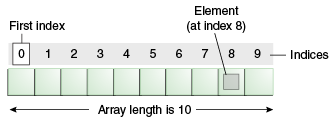
Example: Manually populate an array:
int[] numberList = new int[3]
numberList[0] = 455;
numberList[1] = 22;
numberList[2] = 13; Example: Access a particular index of the array:
int selectedIndex = numberList[2];
The above statement will get the element at index [2] and assign it to the variable called selectedIndex. As such, selectedIndex now has a value of 13.
Remember, the array index starts at 0, so in the above example we can say that the 2nd element of the array is at index 1.
Example: Use a for loop to iterate the array and display each index:
Arrays are often used in conjunction with a for-loop. We use the loop counter to access each element in the array.
Arrays have a Length property which will return the number of elements in the array.
for (int x = 0; x < numberList.length; x ++) {
System.out.println(numberList[x]);
}The loop is primed in the following way:
- The loop counter begins at 0 (the same value as the first element of our array)
- The loop will continue while the loop counter is less than the length of the array
- The loop counter will be incremented on each pass of the loop
The body of the loop then uses the loop counter to access the current element of the array.
In cases where you need a collection to grow as needed, other collection types such as the ArrayList may be used.
Also see:
"Arrays (The Java™ Tutorials > Learning the Java Language > Language Basics)" ( http://bit.ly/K4Arb2 )
Tuesday, April 17, 2012
For-each Loop
"Java: For-each Loop" ( http://bit.ly/HThpAk )
For each Line in the array called myLine.
Subscribe to:
Posts (Atom)