Showing posts with label Collection. Show all posts
Friday, August 30, 2013
HashMap
A HashMap is just like TreeMap except that a HashMap is not ordered by its keys.
See long post on TreeMap for methods and iteration technique. Go!
Wednesday, May 1, 2013
Wednesday, April 10, 2013
TreeMap
- The TreeMap is part of the Java Collections Framework.
- TreeMap is a concrete class which implements the Map interface, which maps keys to values.
- Keys are like the index of an ArrayList except that the index of an ArrayList is an int. A map key can be any object.
- A map cannot contain duplicate keys - each key maps to one value.
- A key and it's corresponding value form an entry or entry-set. Let's call them key/value pairs.
- A TreeMap is sorted by the natural ordering of it's keys.
Instantiation
Map<key,Value> = new TreeMap<Key,Value>();
(As map is an Interface, it cannot be instantiated.)
get(Object key)
Returns the value for the specified key. If a value at that key does not exist, null is returned. While this is most forgiving, always check the return value for null before attempting to use it.
Object o = myMap.get(x);
if (o != null) {...};
containsKey(int key)
Returns True if the specified key is found in the map. (False is not!).
if (myMap.containsKey(x)) {...};
put(Object key, Object value)
Puts the new value at the specified key. If the key already exists, the old value is replaced. So be careful!
myMap.put(x,o);
size()
Returns the number of key/value pairs.
myMap.size();
remove(int key)
Removes the value at the specified key. If no value as associated with the key, the method simply exits.
myMap.remove(x);
putAll(Map)
Copies all of the mappings from the specified map, to this map. Both maps must have the same key and value type. Beware though, if there are values for identical keys, the old value will be replaced with the new value - as per the *no duplicates* rule.
For instance:
Map<Integer, String> mapOne = new TreeMap<Integer,String>();
mapOne.put(10, "ten");
mapOne.put(3, "three");
Map<Integer,String> mapTwo = new TreeMap<Integer,String>();
mapTwo.put(50, "fifty");
mapTwo.put(10, "ten");
mapOne.putAll(mapTwo);
mapOne now contains the following key/value pairs (sorted):
- 3, "three"
- 10, "ten"
- 50, "fifty"
Iterating (looping) using Enhanced For Loop
The following methods are utilised in the enhanced for loop example below:
- entrySet() returns a view of the key/value pairs in the map.
- getKey() returns the key in the current iteration.
- getValue() returns the value of the key in the current iteration
In plain English, we are saying that for each Integer and String, key/value pair in the map.
for (Map.Entry<Integer, String> mapEntries : mapOne.entrySet()) {
int key = mapEntries.getKey();
String value = mapEntries.getValue();
System.out.println("Key is: " + key);
System.out.println("Value is: " + value);
}
We would expect the output to look like:
3
three
10
ten
50
fifty
Pulling keys or values out of Map and into ArrayList
In this example, a map of Integer,Integer is split into two lists - one for keys and one for values.
List<Integer> listOfMapKeys = new ArrayList<Integer>(mapname.keySet());
List<Integer> listOfMapValues = new ArrayList<Integer>(mapname.values());
But the coolest stuff is yet to come!!! Read on in NavigableMap Interface >>>
In this example, a map of Integer,Integer is split into two lists - one for keys and one for values.
List<Integer> listOfMapKeys = new ArrayList<Integer>(mapname.keySet());
List<Integer> listOfMapValues = new ArrayList<Integer>(mapname.values());
But the coolest stuff is yet to come!!! Read on in NavigableMap Interface >>>
(also, will post code download soon too!)
(also, IS ANYONE READING THIS?) :p
Tuesday, May 8, 2012
ArrayList
An ArrayList is a resizable array. There is no need to tell the ArrayList how many items it can store.
Similar to an array, in that all objects in the ArrayList occupy an index (and remember, indexes begin at 0).
Additionally, items may be added and removed without providing an index.
Instantiating ArrayList
Syntax:
ArrayList<Type> identifier = new ArrayList<Type>();
example:
ArrayList<String> customerNames = new ArrayList<String>();
In the example above, the ArrayList can store a collection of Strings.
We can also add user defined types (Types/classes we have created) to ArrayList.
Let's say for instance we have a class type called Player. We can create an ArrayList to store a collection of Player objects:
example:
ArrayList<Player> playerList = new ArrayList<Player>();
Adding to ArrayList
Syntax:
identifier.add(object);
example:
playerList.add(new Player("baz",100));
In the example above, a Player is added to the ArrayList. The new object is added to the end of the list.
Notice that we can instantiate the Player object directly into the add method.
Alternatively, we could add an existing Player object to the ArrayList:
Player p = new Player("maz",200);
playerList.add(p);
Replacing an element in ArrayList
Syntax:
identifier.set(index,object);
example:
playerList.set(10, new Player("baz",100));
In the example above, a Player object at index 10 is replaced in the ArrayList.
Removing from ArrayList
Syntax:
identifier.remove(index);
example:
playerList.remove(3);
Check ArrayList for element
Syntax:
identifier.contains(object);
example:
playerList.contains(myObj);
In the example above, the list will return true or false depending on whether the object called obj is found in the list - note: you must override the equals method to use this effectively!.
Getting the number of items in ArrayList
Syntax:
identifier.size();
example:
playerList.size();
In the example below, the size function is used to set the continuation condition in a for loop:
for (int x = 0; x < playerList.size(); x ++) { }
Looping through ArrayList
ArrayList contains a method called get which enables you to return the object in the list at a specific index.
Syntax:
identifier.get(index);
example:
playerList.get(1);
In the above example, we get the Player object at index 1 (the second object in the list).
In the example below, we loop through an ArrayList, using the loop counter to get each object in turn:
for (int x = 0; x < playerList.size(); x ++) {
Player currentPlayer = playerList.get(x);
}
If there are 20 Player objects in the list, the loop will iterate 20 times. On each pass of the loop, the get method returns the Player object at the specified index. As we are using the loop counter to provide this value, we are able to get each object in the list, in turn.
Searching ArrayList for a particular object
In the following example, we search ArrayList for a Player object, by playerID (the particular playerID is passed to the function as a parameter). An equality comparison is performed within the loop using the equality operator ( = = ):
public Player searchForPlayer(int playerID) {
Player p = null;
for (int x = 0; x < playerList.size(); x ++) {
Player currentPlayer = playerList.get(x);
if (currentPlayer.getID == playerID) {
p = currentPlayer;
}
}
return p;
}
In the following example, we search ArrayList for a Player object, by playerName (the particular playerName is passed to the function as a parameter). An equality comparison is performed within the loops using the equals function:
public Player searchForPlayer(String playerName) {
Player p = null;
for (int x = 0; x < playerList.size(); x ++) {
Player currentPlayer = playerList.get(x);
if (currentPlayer.getName.equals(playerName) {
p = currentPlayer;
}
}
return p;
}
"ArrayList (Java 2 Platform SE v1.4.2)" ( http://bit.ly/Ja6HGS )
Similar to an array, in that all objects in the ArrayList occupy an index (and remember, indexes begin at 0).
Additionally, items may be added and removed without providing an index.
Instantiating ArrayList
Syntax:
ArrayList<Type> identifier = new ArrayList<Type>();
example:
ArrayList<String> customerNames = new ArrayList<String>();
In the example above, the ArrayList can store a collection of Strings.
We can also add user defined types (Types/classes we have created) to ArrayList.
Let's say for instance we have a class type called Player. We can create an ArrayList to store a collection of Player objects:
example:
ArrayList<Player> playerList = new ArrayList<Player>();
Adding to ArrayList
Syntax:
identifier.add(object);
example:
playerList.add(new Player("baz",100));
In the example above, a Player is added to the ArrayList. The new object is added to the end of the list.
Notice that we can instantiate the Player object directly into the add method.
Alternatively, we could add an existing Player object to the ArrayList:
Player p = new Player("maz",200);
playerList.add(p);
Replacing an element in ArrayList
Syntax:
identifier.set(index,object);
example:
playerList.set(10, new Player("baz",100));
In the example above, a Player object at index 10 is replaced in the ArrayList.
Removing from ArrayList
Syntax:
identifier.remove(index);
example:
playerList.remove(3);
Check ArrayList for element
Syntax:
identifier.contains(object);
example:
playerList.contains(myObj);
In the example above, the list will return true or false depending on whether the object called obj is found in the list - note: you must override the equals method to use this effectively!.
Getting the number of items in ArrayList
Syntax:
identifier.size();
example:
playerList.size();
In the example below, the size function is used to set the continuation condition in a for loop:
for (int x = 0; x < playerList.size(); x ++) { }
Looping through ArrayList
ArrayList contains a method called get which enables you to return the object in the list at a specific index.
Syntax:
identifier.get(index);
example:
playerList.get(1);
In the above example, we get the Player object at index 1 (the second object in the list).
In the example below, we loop through an ArrayList, using the loop counter to get each object in turn:
for (int x = 0; x < playerList.size(); x ++) {
Player currentPlayer = playerList.get(x);
}
If there are 20 Player objects in the list, the loop will iterate 20 times. On each pass of the loop, the get method returns the Player object at the specified index. As we are using the loop counter to provide this value, we are able to get each object in the list, in turn.
Searching ArrayList for a particular object
In the following example, we search ArrayList for a Player object, by playerID (the particular playerID is passed to the function as a parameter). An equality comparison is performed within the loop using the equality operator ( = = ):
public Player searchForPlayer(int playerID) {
Player p = null;
for (int x = 0; x < playerList.size(); x ++) {
Player currentPlayer = playerList.get(x);
if (currentPlayer.getID == playerID) {
p = currentPlayer;
}
}
return p;
}
In the following example, we search ArrayList for a Player object, by playerName (the particular playerName is passed to the function as a parameter). An equality comparison is performed within the loops using the equals function:
public Player searchForPlayer(String playerName) {
Player p = null;
for (int x = 0; x < playerList.size(); x ++) {
Player currentPlayer = playerList.get(x);
if (currentPlayer.getName.equals(playerName) {
p = currentPlayer;
}
}
return p;
}
"ArrayList (Java 2 Platform SE v1.4.2)" ( http://bit.ly/Ja6HGS )
Labels:
ArrayList,
Collection,
Comparison,
Equality,
equals(),
Loop,
Many,
Operators
Monday, May 7, 2012
Java Arrays
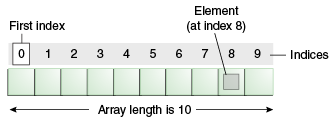
Whilst a variable can hold a single data item of a specified type, an array can hold a number of data items of a specified type.
The following example shows an array of 7 strings. The array stores the names of the days of the week. Once this collection is stored, we can access each string in the array by it's index.
Syntax:
Type[] identifier = new Type[length];
Example:
String[] names = new String[10];
Arrays need to be declared as a certain length - for instance, the example above will hold 10 Strings.
Each item in the array occupies an index. Indexes begin at 0 (zero) in an array.
Example: Manually populate an array:
int[] numberList = new int[3]
numberList[0] = 455;
numberList[1] = 22;
numberList[2] = 13; Example: Access a particular index of the array:
int selectedIndex = numberList[2];
The above statement will get the element at index [2] and assign it to the variable called selectedIndex. As such, selectedIndex now has a value of 13.
Remember, the array index starts at 0, so in the above example we can say that the 2nd element of the array is at index 1.
Example: Use a for loop to iterate the array and display each index:
Arrays are often used in conjunction with a for-loop. We use the loop counter to access each element in the array.
Arrays have a Length property which will return the number of elements in the array.
for (int x = 0; x < numberList.length; x ++) {
System.out.println(numberList[x]);
}The loop is primed in the following way:
- The loop counter begins at 0 (the same value as the first element of our array)
- The loop will continue while the loop counter is less than the length of the array
- The loop counter will be incremented on each pass of the loop
The body of the loop then uses the loop counter to access the current element of the array.
In cases where you need a collection to grow as needed, other collection types such as the ArrayList may be used.
Also see:
"Arrays (The Java™ Tutorials > Learning the Java Language > Language Basics)" ( http://bit.ly/K4Arb2 )
Tuesday, November 15, 2011
Set
a collection that cannot contain duplicate elements
Subscribe to:
Posts (Atom)