
Showing posts with label Array. Show all posts
Showing posts with label Array. Show all posts
Wednesday, May 1, 2013

Wednesday, April 17, 2013
Bubble Sort algorithm
The Bubble Sort algorithm is named as such after the way in which values bubble to the top.
It is a suitable sorting algorithm for small unsorted lists and arrays.
You may like to watch the video at the end of this post before reading on (skip to about 50 seconds in).
Let's take the example of a small array of 5 elements:
int numList[] = {100,40,2,1,89};
In it's sorted form, the list of numbers would look like this:
1,2,40,89,100
So how do we get there?
Using a for-loop, we will bubble sort the values by checking if the current value is greater than the next value in the array:
for (int x = 0; x < numList.length - 1; x++) {
if (numList[x] > numList[x+1] )
If true, we need to swap the numbers in the array, but to do so, we will need to store the current value in a temporary variable, so that the next value can be placed into the current value's place in the array - like so:
int temp = numList[x];
numList[x] = numList[x+1];
numList[x+1] = temp;

If false, we do nothing and allow the loop to continue.
Note that the loop is primed so that the loop counter (x) is never greater than the array's length minus one - which in this example would mean that x is never greater than 3. This is because the final swap possible is between indexes 3 & 4 and we don't want to generate an ArrayIndexOutOfBoundsException when we execute the expression numList[x+1].
If the length of the list we need to sort is 5, it will take 4 loops to sort the list, once.
First pass:
100,40,2,1,89 becomes 40,2,1,89,100
We can see that 100 has bubbled to the end of the list, however, the list is still not sorted. If the length of the list is 5, it will take 16 loops (maximum) to ensure that each position is sorted.
We will need to use an outer loop and and inner loop (nested loops) to ensure that all elements are sorted.

And here is the output of each outer loop:


The video is quite cool :)
It is a suitable sorting algorithm for small unsorted lists and arrays.
You may like to watch the video at the end of this post before reading on (skip to about 50 seconds in).
Let's take the example of a small array of 5 elements:
int numList[] = {100,40,2,1,89};
In it's sorted form, the list of numbers would look like this:
1,2,40,89,100
So how do we get there?
Using a for-loop, we will bubble sort the values by checking if the current value is greater than the next value in the array:
for (int x = 0; x < numList.length - 1; x++) {
if (numList[x] > numList[x+1] )
If true, we need to swap the numbers in the array, but to do so, we will need to store the current value in a temporary variable, so that the next value can be placed into the current value's place in the array - like so:
int temp = numList[x];
numList[x] = numList[x+1];
numList[x+1] = temp;
If false, we do nothing and allow the loop to continue.
Note that the loop is primed so that the loop counter (x) is never greater than the array's length minus one - which in this example would mean that x is never greater than 3. This is because the final swap possible is between indexes 3 & 4 and we don't want to generate an ArrayIndexOutOfBoundsException when we execute the expression numList[x+1].
If the length of the list we need to sort is 5, it will take 4 loops to sort the list, once.
First pass:
100,40,2,1,89 becomes 40,2,1,89,100
We can see that 100 has bubbled to the end of the list, however, the list is still not sorted. If the length of the list is 5, it will take 16 loops (maximum) to ensure that each position is sorted.
We will need to use an outer loop and and inner loop (nested loops) to ensure that all elements are sorted.
Note that in this example, it actually only took 3 outer loops (12 loops total) to sort the array. If we used the following array:
5,4,3,2,1
... it would take 16 repetitions to sort the array completely - this is because the largest number in the array (5) is in the first position and therefore has the entire length of the array to be sorted through.
Here's the output of bubble sorting that list:
Wednesday, May 23, 2012
The split function
DOWNLOAD THE CODE: usingSplit.java.zip
Example 1: split a string using a space as the delimiter:

Output:

Example 2: split a string using a comma (,) as the delimiter:

Output:

Monday, May 7, 2012
Java Arrays
Whilst a variable can hold a single data item of a specified type, an array can hold a number of data items of a specified type.
The following example shows an array of 7 strings. The array stores the names of the days of the week. Once this collection is stored, we can access each string in the array by it's index.

Syntax:
Type[] identifier = new Type[length];
Example:
String[] names = new String[10];
Arrays need to be declared as a certain length - for instance, the example above will hold 10 Strings.
Each item in the array occupies an index. Indexes begin at 0 (zero) in an array.
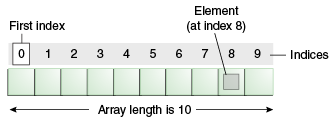
Example: Manually populate an array:
int[] numberList = new int[3]
numberList[0] = 455;
numberList[1] = 22;
numberList[2] = 13; Example: Access a particular index of the array:
int selectedIndex = numberList[2];
The above statement will get the element at index [2] and assign it to the variable called selectedIndex. As such, selectedIndex now has a value of 13.
Remember, the array index starts at 0, so in the above example we can say that the 2nd element of the array is at index 1.
Example: Use a for loop to iterate the array and display each index:
Arrays are often used in conjunction with a for-loop. We use the loop counter to access each element in the array.
Arrays have a Length property which will return the number of elements in the array.
for (int x = 0; x < numberList.length; x ++) {
System.out.println(numberList[x]);
}The loop is primed in the following way:
- The loop counter begins at 0 (the same value as the first element of our array)
- The loop will continue while the loop counter is less than the length of the array
- The loop counter will be incremented on each pass of the loop
The body of the loop then uses the loop counter to access the current element of the array.
In cases where you need a collection to grow as needed, other collection types such as the ArrayList may be used.
Also see:
"Arrays (The Java™ Tutorials > Learning the Java Language > Language Basics)" ( http://bit.ly/K4Arb2 )
Sunday, April 29, 2012
Instantiation and object arrays
When we create an object from a class we are said to be 'instantiating an object from a class'.
Format:
ObjectType Identifier = new ObjectType(Parameters if any);
'new' is a keyword that calls the constructor of the class.
Consider the following class called NetworkUser:


Format:
ObjectType Identifier = new ObjectType(Parameters if any);
'new' is a keyword that calls the constructor of the class.
Consider the following class called NetworkUser:
To create an object from this class, we must declare a new NetworkUser. Each object we create from the class must have a unique identifier/name. The following code instantiates 3 NetworkUser objects, and calls a couple of their methods:
The following output is produced:
Object arrays
Alternatively, the NetworkUsers could be stored in an array and we could loop through each one to display their credentials:
The first statement instantiates an array of type NetworkUser. Only objects of type NetworkUser can be stored in the array. The array has a length of 3 which means that the first index (position) is 0 and the final is 2.
The next 3 statements instantiate a NetworkUser object directly into each index of the array. CurrentUsers[0] is a reference to the first index of the array called currentUsers. This is followed by the assignment operator (=) which is then followed by the object that will be stored in this index.
The for loop is primed to loop for as many times are there are indexes in the currentUsers array - the loop counter (x) starts at 0 (the same as the first index of the array) and is incremented on each pass of the loop by 1 until it reaches 2 (the final index of the array).
The print statements inside of the loop get the current NetworkUser in the array by using the statement currentUsers[x].
On the first pass of the loop, this will return the NetworkUser object at currentUsers[0].
On the second pass of the loop, this will return the NetworkUser object at currentUsers[1].
On the third pass of the loop, this will return the NetworkUser object at currentUsers[2].
All that's left to do is call the methods of NetworkUser. In this case, getUserName() and getPassword() are called.
Here's what the output looks like:
See more at pastebin.
Err, here's a cat (at animals[2]):
Subscribe to:
Posts (Atom)