Thursday, May 10, 2012

Encapsulation: Public & Private

"Controlling Access to Members of a Class (The Java™ Tutorials > Learning the Java Language > Classes and Objects)" ( http://bit.ly/JgfUgH )


What is Encapsulation?
Encapsulation is the process of packaging the base functionality of a class and providing access to the features of the class through a collection of behaviors. This means that the inner workings of the class are hidden from other classes and cannot be directly accessed.

 
Objects are responsible for maintaining their own state & behavior.

Another way to refer to encapsulation is 'information hiding'.

Following the laws of encapsulation, when designing a class, it is important to define the visibility of the states and behaviors contained within the class. This is known as visibility.

 Private
A variable/state, method that is declared as private is only visible to the class that contains the variable or method. For instance:


The above class (Player) contains 5 private states (implemented as variables). As these states are private, they can only be modified directly from within the Player class.

When a state is private, no other object can read or change the value, directly. Getter & setter behaviors must be provided to allow access to these states, where access is required.

Public
Variables/states, methods & classes that are declared as public are visible to all other classes. For instance:


The above method is the constructor of the Player class. As a constructor is the first method called in the instantiation (object creation) process, it is vital that this constructor has a visibility of public.

Also:


The above getter & setter behaviors also belong to the Player class. These behaviors allow access to the internal state called _name. As such, they both have a visibility of public.

Getters & setters

"Mutator method - Wikipedia, the free encyclopedia" ( http://bit.ly/K3zSdR )

Tuesday, May 8, 2012

ArrayList

An ArrayList is a resizable array. There is no need to tell the ArrayList how many items it can store.

Similar to an array, in that all objects in the ArrayList occupy an index (and remember, indexes begin at 0).

Additionally, items may be added and removed without providing an index.

Instantiating ArrayList

Syntax:
ArrayList<Type> identifier = new ArrayList<Type>();


example:
ArrayList<String> customerNames = new ArrayList<String>();


In the example above, the ArrayList can store a collection of Strings.

We can also add user defined types (Types/classes we have created) to ArrayList.

Let's say for instance we have a class type called Player. We can create an ArrayList to store a collection of Player objects:


example:
ArrayList<Player> playerList = new ArrayList<Player>();


Adding to ArrayList

Syntax:
identifier.add(object);


example:
playerList.add(new Player("baz",100));


In the example above, a Player is added to the ArrayList. The new object is added to the end of the list.

Notice that we can instantiate the Player object directly into the add method.

Alternatively, we could add an existing Player object to the ArrayList:

Player p = new Player("maz",200);
playerList.add(p);

Replacing an element in ArrayList

Syntax:
identifier.set(index,object);

example:
playerList.set(10, new Player("baz",100));


In the example above, a Player object at index 10 is replaced in the ArrayList.


Removing from ArrayList

Syntax:
identifier.remove(index);


example:
playerList.remove(3);


Check ArrayList for element

Syntax:
identifier.contains(object);

example:
playerList.contains(myObj);

In the example above, the list will return true or false depending on whether the object called obj is found in the list - note: you must override the equals method to use this effectively!.


Getting the number of items in ArrayList

Syntax:
identifier.size();


example:
playerList.size();


In the example below, the size function is used to set the continuation condition in a for loop:

for (int x = 0; x < playerList.size(); x ++) { }


Looping through ArrayList

ArrayList contains a method called get which enables you to return the object in the list at a specific index.

Syntax:
identifier.get(index);


example:
playerList.get(1);


In the above example, we get the Player object at index 1 (the second object in the list).

In the example below, we loop through an ArrayList, using the loop counter to get each object in turn:

for (int x = 0; x < playerList.size(); x ++) {
Player currentPlayer = playerList.get(x);
}

If there are 20 Player objects in the list, the loop will iterate 20 times. On each pass of the loop, the get method returns the Player object at the specified index. As we are using the loop counter to provide this value, we are able to get each object in the list, in turn.


Searching ArrayList for a particular object

In the following example, we search ArrayList for a Player object, by playerID (the particular playerID is passed to the function as a parameter). An equality comparison is performed within the loop using the equality operator ( = = ):

public Player searchForPlayer(int playerID) {
Player p = null;

for (int x = 0; x < playerList.size(); x ++) {
Player currentPlayer = playerList.get(x);
if (currentPlayer.getID == playerID) {
p = currentPlayer;
}
}
return p;
}

In the following example, we search ArrayList for a Player object, by playerName (the particular playerName is passed to the function as a parameter). An equality comparison is performed within the loops using the equals function:


public Player searchForPlayer(String playerName) {
Player p = null;

for (int x = 0; x < playerList.size(); x ++) {
Player currentPlayer = playerList.get(x);
if (currentPlayer.getName.equals(playerName) {
p = currentPlayer;
}
}
return p;
}

"ArrayList (Java 2 Platform SE v1.4.2)" ( http://bit.ly/Ja6HGS )

BigDecimal

"BigDecimal (Java 2 Platform SE 5.0)" ( http://bit.ly/IUJqcK )

Monday, May 7, 2012

Layout Managers

"A Visual Guide to Layout Managers (The Java™ Tutorials > Creating a GUI With JFC/Swing > Laying Out Components Within a Container)" ( http://bit.ly/LpAHle )

Java Arrays


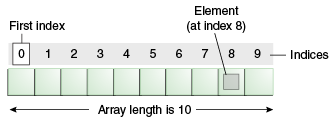
Whilst a variable can hold a single data item of a specified type, an array can hold a number of data items of a specified type.

The following example shows an array of 7 strings. The array stores the names of the days of the week. Once this collection is stored, we can access each string in the array by it's index.


Syntax:
Type[] identifier = new Type[length];

Example:
String[] names = new String[10];

Arrays need to be declared as a certain length - for instance, the example above will hold 10 Strings.

Each item in the array occupies an index. Indexes begin at 0 (zero) in an array.


Example: Manually populate an array:

int[] numberList = new int[3]
numberList[0] = 455;
numberList[1] = 22;
numberList[2] = 13;

 Example: Access a particular index of the array:

int selectedIndex = numberList[2];

The above statement will get the element at index [2] and assign it to the variable called selectedIndex. As such, selectedIndex now has a value of 13.

Remember, the array index starts at 0, so in the above example we can say that the 2nd element of the array is at index 1.

Example: Use a for loop to iterate the array and display each index:

Arrays are often used in conjunction with a for-loop. We use the loop counter to access each element in the array.

Arrays have a Length property which will return the number of elements in the array.

for (int x = 0; x < numberList.length; x ++) {
       System.out.println(numberList[x]);
}

The loop is primed in the following way:

  • The loop counter begins at 0 (the same value as the first element of our array)
  • The loop will continue while the loop counter is less than the length of the array
  • The loop counter will be incremented on each pass of the loop

The body of the loop then uses the loop counter to access the current element of the array.

In cases where you need a collection to grow as needed, other collection types such as the ArrayList may be used.

Also see:
"Arrays (The Java™ Tutorials > Learning the Java Language > Language Basics)" ( http://bit.ly/K4Arb2 )

Saturday, May 5, 2012

GridLayout


From
http://docs.oracle.com/javase/1.4.2/docs/api/java/awt/GridLayout.html :

The GridLayout class is a layout manager that lays out a container's components in a rectangular grid. The container is divided into equal-sized rectangles, and one component is placed in each rectangle. For example, the following is an applet that lays out six buttons into three rows and two columns:


Often used to compose the layout of a Jpanel. Its constructor takes 2 parameters - number of rows in the grid and number of columns in the grid.